
If, like me, you are constantly wanting to just extract the files from a Windows Installer MSI file quickly, then this is for you.
My ZIP utility of choice 7-Zip appears to support extracting MSI files but in fact extracts all the various weird and wonderful binary streams in the MSI rather than simply just the actual files. Thankfully I stumbled across a Windows Installer switch today after typing msiexec /? that does the job perfectly: the /a “administrative install” switch, e.g.:
msiexec /a foo.msi /qb TARGETDIR="C:TEMPFoo"
So, what I’ve done is packaged this up as a little registry tweak that conveniently lets you do this by simply right clicking a file like so:
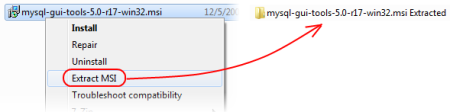
Copy and paste the following into a *.reg file and double-click it:
Windows Registry Editor Version 5.00
[HKEY_CURRENT_USERSoftwareClassesMsi.PackageshellExtract MSIcommand]
@="msiexec.exe /a "%1" /qb TARGETDIR="%1 Extracted""
Hope that helps!
 Duncan Smart's Blog